My qualification FAQs

How do I get a copy of my certificate?

You will be given a printed certificate by your Competenz contact when you complete your qualification. Or your certificate will be couriered to your workplace.

‍We are only able to re-print your certificate if it is LOST or DAMAGED.  If you would like us to reprint your certificate for you, there is a cost of $120.75 incl GST.

Email support@competenz.org.nz and include:

  • Your full name
  • Your date of birth
  • Your NSN number (if known)
  • The qualification you completed

Once payment is received, your replacement certificate will be couriered to your nominated address.

Please note: Competenz can only reprint certificates for qualifications completed after August 2012. If your qualification was completed before this date, please contact NZQA.

How do I get a copy of my certificate?

You will be given a printed certificate by your Competenz contact when you complete your qualification. Or your certificate will be couriered to your workplace.

‍We are only able to re-print your certificate if it is LOST or DAMAGED.  If you would like us to reprint your certificate for you, there is a cost of $120.75 incl GST.

Email support@competenz.org.nz and include:

  • Your full name
  • Your date of birth
  • Your NSN number (if known)
  • The qualification you completed

Once payment is received, your replacement certificate will be couriered to your nominated address.

Please note: Competenz can only reprint certificates for qualifications completed after August 2012. If your qualification was completed before this date, please contact NZQA.

What happens when you’ve finished an apprenticeship/traineeship?

When you finish your apprenticeship or traineeship, you will be marked as completed in our database once your final unit standard result has been entered.

For Engineering trade qualifications and apprenticeships, completion also requires confirmation from your employer of the total hours you have worked during your apprenticeship. These hours are submitted as part of the completion documentation. As most apprenticeships run for around four years, this typically equates to approximately 8,000 hours of work and training.

Once all requirements are confirmed and your completion has been processed, you will receive a printed certificate from your Competenz contact, or it will be couriered to your workplace.

What happens when you’ve finished an apprenticeship/traineeship?

When you finish your apprenticeship or traineeship, you will be marked as completed in our database once your final unit standard result has been entered.

For Engineering trade qualifications and apprenticeships, completion also requires confirmation from your employer of the total hours you have worked during your apprenticeship. These hours are submitted as part of the completion documentation. As most apprenticeships run for around four years, this typically equates to approximately 8,000 hours of work and training.

Once all requirements are confirmed and your completion has been processed, you will receive a printed certificate from your Competenz contact, or it will be couriered to your workplace.

I thought I’d finished my training?

If you have access to Competenz Central you can see your training plan by logging in to Competenz Central. This will show your ‘To-do’ unit standards and your ‘Achieved’ unit standards.

If you do not have access to Competenz Central you can ask your Competenz contact to run a qualification check to see what unit standards are outstanding to complete your qualification.

I thought I’d finished my training?

If you have access to Competenz Central you can see your training plan by logging in to Competenz Central. This will show your ‘To-do’ unit standards and your ‘Achieved’ unit standards.

If you do not have access to Competenz Central you can ask your Competenz contact to run a qualification check to see what unit standards are outstanding to complete your qualification.

Can I do my assessments online?

Some unit standards are available through Canvas online learning, but not all assessments can be completed online.

Your Training Plan Report tells you which units are delivered online and marked by an e Assessor or are On Job and marked by your TA. The units themselves are also described as (On-Job) or (On Line) in their title.  

You can also check the Canvas help section for a list of unit standards that are available online.

Can I do my assessments online?

Some unit standards are available through Canvas online learning, but not all assessments can be completed online.

Your Training Plan Report tells you which units are delivered online and marked by an e Assessor or are On Job and marked by your TA. The units themselves are also described as (On-Job) or (On Line) in their title.  

You can also check the Canvas help section for a list of unit standards that are available online.

I am stuck with an assessment, how can I get help?

If you need help with an assessment, the best person to contact is your assessor or training advisor.

Support may come from:

  • Your supervisor or workplace trainer
  • Your training advisor
  • A Competenz assessor
  • A Competenz eAssessor for online learning

Your supervisor may help guide your learning, but the final assessment decision is made by a Competenz assessor.

If you are unsure who to contact, speak with your training advisor.

I am stuck with an assessment, how can I get help?

If you need help with an assessment, the best person to contact is your assessor or training advisor.

Support may come from:

  • Your supervisor or workplace trainer
  • Your training advisor
  • A Competenz assessor
  • A Competenz eAssessor for online learning

Your supervisor may help guide your learning, but the final assessment decision is made by a Competenz assessor.

If you are unsure who to contact, speak with your training advisor.

Why is my answer incorrect?

Your assessor will provide feedback for questions that are  incorrect.

For online assessments using Canvas: The eAssessor will direct you to the relevant learning material


For paper-based assessments: Your assessor will send you feedback on your completion of the assessment guide and/or evidence provided. This is normally emailed to the learner.

Why is my answer incorrect?

Your assessor will provide feedback for questions that are  incorrect.

For online assessments using Canvas: The eAssessor will direct you to the relevant learning material


For paper-based assessments: Your assessor will send you feedback on your completion of the assessment guide and/or evidence provided. This is normally emailed to the learner.

What do I have left to complete my qualification?

If you have access to Competenz Central you can see your training plan by logging in to Competenz Central. This will show your ‘To-do’ unit standards and your ‘Achieved’ unit standards.

If you do not have access to Competenz Central you can ask your Competenz contact/Training Advisor to give you a Training Plan Report to see what unit standards are outstanding to complete your qualification.

What do I have left to complete my qualification?

If you have access to Competenz Central you can see your training plan by logging in to Competenz Central. This will show your ‘To-do’ unit standards and your ‘Achieved’ unit standards.

If you do not have access to Competenz Central you can ask your Competenz contact/Training Advisor to give you a Training Plan Report to see what unit standards are outstanding to complete your qualification.

I have completed a unit standard, but it is still showing as outstanding on my training plan and record of achievement – why?

It can take between 1 – 3 months for unit standard results to be entered into our database.

If it has been over 3 months and the result has still not appeared on your training plan and/or your record of achievement, then please talk to your Competenz contact/training advisor  or. If you still have difficulty, please call our Customer Services Team on 0800 526 1800 or email support@competenz.org.nz.

I have completed a unit standard, but it is still showing as outstanding on my training plan and record of achievement – why?

It can take between 1 – 3 months for unit standard results to be entered into our database.

If it has been over 3 months and the result has still not appeared on your training plan and/or your record of achievement, then please talk to your Competenz contact/training advisor  or. If you still have difficulty, please call our Customer Services Team on 0800 526 1800 or email support@competenz.org.nz.

How can I see what unit standards I have achieved?

If you have access to Competenz Central you can see your training plan and your record of achievement by logging in to Competenz Central. Click on the tab Training Plan and Achievement.
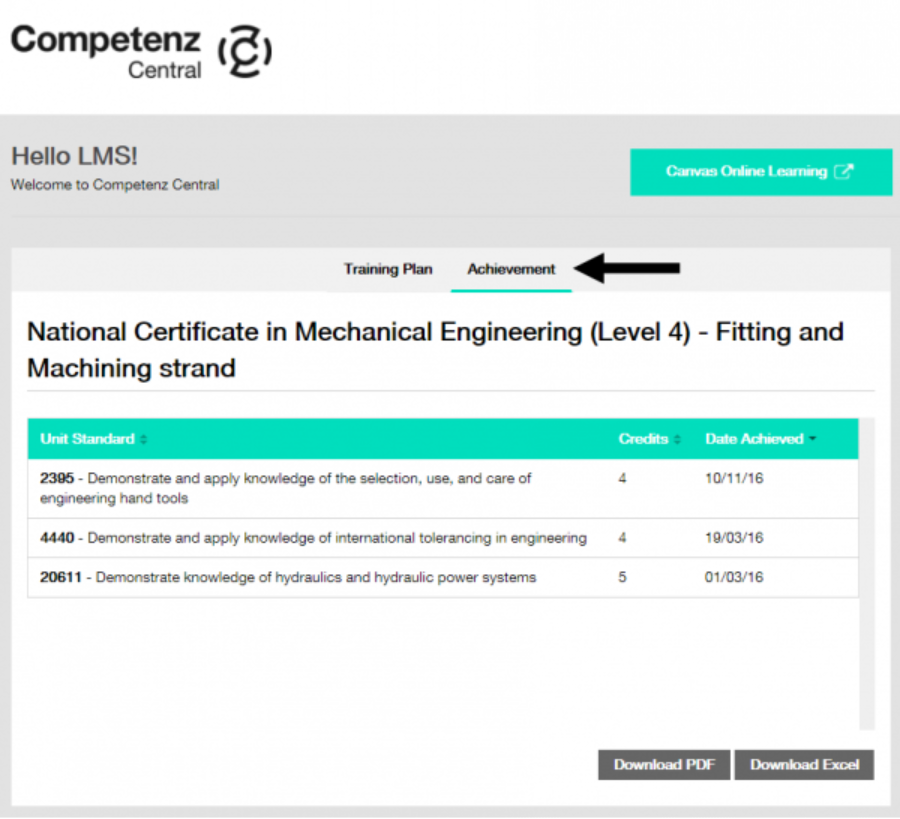
Both your training plan and your record of achievement will show you which unit standards you have or have not yet achieved. Though it can take between 1 – 3 months for unit standard results to be entered into our database.

‍If you do not have access to Competenz Central you can visit the NZQA website and login to NZQA learner log-in to see your record of achievement. OR, talk to your Competenz contact to get a copy of your training plan.

‍If you still have difficulty, please call our Customer Services Team on 0800 526 1800 or email support@competenz.org.nz.  

How can I see what unit standards I have achieved?

If you have access to Competenz Central you can see your training plan and your record of achievement by logging in to Competenz Central. Click on the tab Training Plan and Achievement.

Both your training plan and your record of achievement will show you which unit standards you have or have not yet achieved. Though it can take between 1 – 3 months for unit standard results to be entered into our database.

‍If you do not have access to Competenz Central you can visit the NZQA website and login to NZQA learner log-in to see your record of achievement. OR, talk to your Competenz contact to get a copy of your training plan.

‍If you still have difficulty, please call our Customer Services Team on 0800 526 1800 or email support@competenz.org.nz.  

How can I see my record of achievement?

If you have access to Competenz Central you can see your record of achievement by logging in to Competenz Central. Click on the Achievement tab.

If you do not have access to Competenz Central you can visit the NZQA website and login to the NZQA learner log-in.

If you still have difficulty, please call our Customer Services Team on 0800 526 1800 or email support@competenz.org.nz. We can send you a copy of your record of achievement.

How can I see my record of achievement?

If you have access to Competenz Central you can see your record of achievement by logging in to Competenz Central. Click on the Achievement tab.

If you do not have access to Competenz Central you can visit the NZQA website and login to the NZQA learner log-in.

If you still have difficulty, please call our Customer Services Team on 0800 526 1800 or email support@competenz.org.nz. We can send you a copy of your record of achievement.

How can I see my training plan?

Your Competenz contact /Training Advisor should have given you a paper copy of your training plan when you first signed up. If you have lost this copy, talk to your Competenz contact to get a new copy.

If you have access to Competenz Central you can see your training plan by logging in to Competenz Central. This will show your ‘To-do’ unit standards and your ‘Achieved’ unit standards.

How can I see my training plan?

Your Competenz contact /Training Advisor should have given you a paper copy of your training plan when you first signed up. If you have lost this copy, talk to your Competenz contact to get a new copy.

If you have access to Competenz Central you can see your training plan by logging in to Competenz Central. This will show your ‘To-do’ unit standards and your ‘Achieved’ unit standards.

Canvas Online Learning

What are the recommended system requirements for Canvas online learning?
  • Firefox 131 | 132 (Extended Releases are not supported*)
  • Edge 129 | 130
  • Respondus LockDown Browser (supporting the latest system requirements)
  • Safari 17 | 18 (Macintosh only)

iOS

  • Safari (default browser with limited Canvas support)
  • Chrome

Android

  • Chrome (default browser with limited Canvas support)*
  • Internet
  • Firefox

*Android default browser varies per mobile device.

  • Windows 7 and newer
  • Mac OSX 10.6 and newer
  • Linux – chromeOS
  • Use a computer 5 years old or newer when possible
  • 4GB of RAM
  • 2GHz processor

What are the recommended system requirements for Canvas online learning?
  • Firefox 131 | 132 (Extended Releases are not supported*)
  • Edge 129 | 130
  • Respondus LockDown Browser (supporting the latest system requirements)
  • Safari 17 | 18 (Macintosh only)

iOS

  • Safari (default browser with limited Canvas support)
  • Chrome

Android

  • Chrome (default browser with limited Canvas support)*
  • Internet
  • Firefox

*Android default browser varies per mobile device.

  • Windows 7 and newer
  • Mac OSX 10.6 and newer
  • Linux – chromeOS
  • Use a computer 5 years old or newer when possible
  • 4GB of RAM
  • 2GHz processor

Where are the user guides for Canvas online learning?

The ‘Welcome to Canvas’ course and user guide can be found by clicking on the ‘Help’ tab in Canvas on the left-hand side.

OR, the user guide may already be loaded to your dashboard.

Where are the user guides for Canvas online learning?

The ‘Welcome to Canvas’ course and user guide can be found by clicking on the ‘Help’ tab in Canvas on the left-hand side.

OR, the user guide may already be loaded to your dashboard.

My login does not work for Canvas online learning

Access to Canvas online learning is through Competenz Central.

‍To login to Competenz Central click the link ‘Login Competenz Central’ in the top right-hand corner of this website.

‍If you require further assistance, please call our Customer Services Team on 0800 526 1800 or email support@competenz.org.nz.

My login does not work for Canvas online learning

Access to Canvas online learning is through Competenz Central.

‍To login to Competenz Central click the link ‘Login Competenz Central’ in the top right-hand corner of this website.

‍If you require further assistance, please call our Customer Services Team on 0800 526 1800 or email support@competenz.org.nz.

How do I login to Canvas online learning?

Access to Canvas online learning is through Competenz Central.

‍To login to Competenz Central click the link ‘Login Competenz Central’ in the top right-hand corner of this website.

‍Once you are logged in, click the Canvas online learning button.

How do I login to Canvas online learning?

Access to Canvas online learning is through Competenz Central.

‍To login to Competenz Central click the link ‘Login Competenz Central’ in the top right-hand corner of this website.

‍Once you are logged in, click the Canvas online learning button.

AI Guidance FAQs

Can I use AI for my assessments?

No – You must not use AI to help with assessments.

‍This means no ChatGPT, Copilot, Gemini, or any other AI tools even for rewriting, summarising, or checking your answers.

‍Your assessments need to show your own thinking, skills, and effort. That’s how we know you’re ready for the next step. Please view more detailed information on this here.

Can I use AI for my assessments?

No – You must not use AI to help with assessments.

‍This means no ChatGPT, Copilot, Gemini, or any other AI tools even for rewriting, summarising, or checking your answers.

‍Your assessments need to show your own thinking, skills, and effort. That’s how we know you’re ready for the next step. Please view more detailed information on this here.

Competenz Central

Where do I login to Competenz Central?

To login to Competenz Central click the link ‘Canvas login’ in the top right-hand corner our website.

Where do I login to Competenz Central?

To login to Competenz Central click the link ‘Canvas login’ in the top right-hand corner our website.

How can I request a login for Competenz Central?

Please send an email to support@competenz.org.nz.

We will need to verify your access with your Competenz contact first, so please be aware that your request may take some time.

How can I request a login for Competenz Central?

Please send an email to support@competenz.org.nz.

We will need to verify your access with your Competenz contact first, so please be aware that your request may take some time.

What is Competenz Central?

Competenz Central is an online platform that supports learners, employers and assessors throughout their training.

Learners can use it to:

  • View their training plan
  • Track their progress and achievements
  • Access Canvas online learning
  • Find Competenz contact details

Employers and assessors can also use the platform to monitor learner progress and access training information.

What is Competenz Central?

Competenz Central is an online platform that supports learners, employers and assessors throughout their training.

Learners can use it to:

  • View their training plan
  • Track their progress and achievements
  • Access Canvas online learning
  • Find Competenz contact details

Employers and assessors can also use the platform to monitor learner progress and access training information.

Off job learning FAQs

Can I do more than one course in a year?

You can only do one course per year.

‍If you need to do more than one course in a year then you will require approval. Talk to your Competenz contact if you need to do more than one course in a year.

Can I do more than one course in a year?

You can only do one course per year.

‍If you need to do more than one course in a year then you will require approval. Talk to your Competenz contact if you need to do more than one course in a year.

When will my block course unit standards be registered on my record of achievement?

Block course training providers have within 30 days from the last day of the block course to register your unit standards.

If your unit standards are not appearing as completed on your record of achievement and it has been over 30 days, please call our Customer Services Team on 0800 526 1800 and ask to speak to our Course Management Team.

When will my block course unit standards be registered on my record of achievement?

Block course training providers have within 30 days from the last day of the block course to register your unit standards.

If your unit standards are not appearing as completed on your record of achievement and it has been over 30 days, please call our Customer Services Team on 0800 526 1800 and ask to speak to our Course Management Team.

When is my block course?

Block courses are allocated on a first come first served basis by Competenz Course Admin once your prerequisites for attendance have been met. Your Training Advisor will guide you on Pre Requisites for your block course.

Your employer may be sent and email six to eight weeks prior to the start date inviting you to the first available block course for your preferred provider.  If there are none available in your region you will be given options to a provider possibly outside your region.

‍Once your attendance is confirmed, the block course training provider will send you an email with the course information two weeks prior to the block course starting.

When is my block course?

Block courses are allocated on a first come first served basis by Competenz Course Admin once your prerequisites for attendance have been met. Your Training Advisor will guide you on Pre Requisites for your block course.

Your employer may be sent and email six to eight weeks prior to the start date inviting you to the first available block course for your preferred provider.  If there are none available in your region you will be given options to a provider possibly outside your region.

‍Once your attendance is confirmed, the block course training provider will send you an email with the course information two weeks prior to the block course starting.

Funding

How will the final-year Fees Free impact learners who used first-year Fees Free?

Learners who used first-year Fees Free funding will not be eligible for final-year Fees Free, even if they did not use the full amount they were entitled to.

How will the final-year Fees Free impact learners who used first-year Fees Free?

Learners who used first-year Fees Free funding will not be eligible for final-year Fees Free, even if they did not use the full amount they were entitled to.

What are the key changes under the new final-year Fees Free policy?

The final-year Fees Free policy has replaced the first-year Fees Free policy, as of 1 January 2025.

The final 24 months of work-based training costs may be reimbursed to the learner if they are eligible. Eligible learners will need to make the claim for reimbursement via IRD once they have completed their qualification.

Visit the IRD website for full details.

What are the key changes under the new final-year Fees Free policy?

The final-year Fees Free policy has replaced the first-year Fees Free policy, as of 1 January 2025.

The final 24 months of work-based training costs may be reimbursed to the learner if they are eligible. Eligible learners will need to make the claim for reimbursement via IRD once they have completed their qualification.

Visit the IRD website for full details.

What if I missed the deadline to confirm eligibility for first-year Fees Free?

The deadline to confirm eligibility for first-year Fees Free was 31 December 2025, and this has now passed. If you did not submit a complete and signed statutory declaration to TEC by this date, you are no longer eligible for first-year Fees Free.

You may still be eligible for final-year Fees Free from 2025. To check your eligibility, visit Fees Free – Inland Revenue.

What if I missed the deadline to confirm eligibility for first-year Fees Free?

The deadline to confirm eligibility for first-year Fees Free was 31 December 2025, and this has now passed. If you did not submit a complete and signed statutory declaration to TEC by this date, you are no longer eligible for first-year Fees Free.

You may still be eligible for final-year Fees Free from 2025. To check your eligibility, visit Fees Free – Inland Revenue.

How can I become a Competenz ambassador?

Ambassadors are nominated by Competenz account managers and training advisors. Talk to your Competenz contact if you think you would make a great ambassador.

What are Competenz ambassadors?

Competenz ambassadors are apprentices and trainees who have been selected to represent their trade because they are passionate about what they do. Ambassadors help us to promote Competenz through school visits, marketing campaigns, media appearances and industry events.

Thank you! Your submission has been received!
Oops! Something went wrong while submitting the form.