
Canvas is accessible only within New Zealand and Australia.

Canvas is accessible only within New Zealand and Australia.
You will be given a printed certificate by your Competenz contact when you complete your qualification. Or your certificate will be couriered to your workplace.
We are only able to re-print your certificate if it is LOST or DAMAGED. If you would like us to reprint your certificate for you, there is a cost of $120.75 incl GST.
Email support@competenz.org.nz and include:
Once payment is received, your replacement certificate will be couriered to your nominated address.
Please note: Competenz can only reprint certificates for qualifications completed after August 2012. If your qualification was completed before this date, please contact NZQA.
Some unit standards are available through Canvas online learning, but not all assessments can be completed online.
Your Training Plan Report tells you which units are delivered online and marked by an e Assessor or are On Job and marked by your TA. The units themselves are also described as (On-Job) or (On Line) in their title.
You can also check the Canvas help section for a list of unit standards that are available online.
When you finish your apprenticeship or traineeship, you will be marked as completed in our database once your final unit standard result has been entered.
For Engineering trade qualifications and apprenticeships, completion also requires confirmation from your employer of the total hours you have worked during your apprenticeship. These hours are submitted as part of the completion documentation. As most apprenticeships run for around four years, this typically equates to approximately 8,000 hours of work and training.
Once all requirements are confirmed and your completion has been processed, you will receive a printed certificate from your Competenz contact, or it will be couriered to your workplace.
If you have access to Competenz Central you can see your training plan and your record of achievement by logging in to Competenz Central. Click on the tab Training Plan and Achievement.
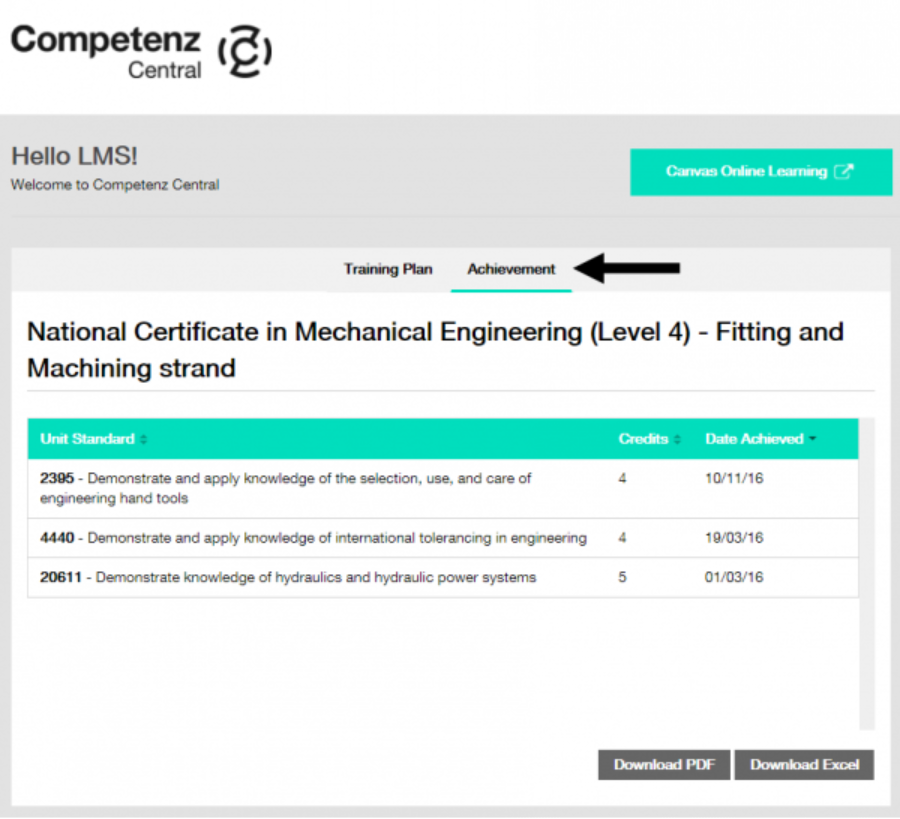
Both your training plan and your record of achievement will show you which unit standards you have or have not yet achieved. Though it can take between 1 – 3 months for unit standard results to be entered into our database.
If you do not have access to Competenz Central you can visit the NZQA website and login to NZQA learner log-in to see your record of achievement. OR, talk to your Competenz contact to get a copy of your training plan.
If you still have difficulty, please call our Customer Services Team on 0800 526 1800 or email support@competenz.org.nz.
If you need help with an assessment, the best person to contact is your assessor or training advisor.
Support may come from:
Your supervisor may help guide your learning, but the final assessment decision is made by a Competenz assessor.
If you are unsure who to contact, speak with your training advisor.
If you have access to Competenz Central you can see your training plan by logging in to Competenz Central. This will show your ‘To-do’ unit standards and your ‘Achieved’ unit standards.
If you do not have access to Competenz Central you can ask your Competenz contact/Training Advisor to give you a Training Plan Report to see what unit standards are outstanding to complete your qualification.
It can take between 1 – 3 months for unit standard results to be entered into our database.
If it has been over 3 months and the result has still not appeared on your training plan and/or your record of achievement, then please talk to your Competenz contact/training advisor or. If you still have difficulty, please call our Customer Services Team on 0800 526 1800 or email support@competenz.org.nz.
Your assessor will provide feedback for questions that are incorrect.
For online assessments using Canvas: The eAssessor will direct you to the relevant learning material
For paper-based assessments: Your assessor will send you feedback on your completion of the assessment guide and/or evidence provided. This is normally emailed to the learner.
Your Competenz contact /Training Advisor should have given you a paper copy of your training plan when you first signed up. If you have lost this copy, talk to your Competenz contact to get a new copy.
If you have access to Competenz Central you can see your training plan by logging in to Competenz Central. This will show your ‘To-do’ unit standards and your ‘Achieved’ unit standards.
Access to Canvas online learning is through Competenz Central.
To login to Competenz Central click the link ‘Login Competenz Central’ in the top right-hand corner of this website.
Once you are logged in, click the Canvas online learning button.

The ‘Welcome to Canvas’ course and user guide can be found by clicking on the ‘Help’ tab in Canvas on the left-hand side.

OR, the user guide may already be loaded to your dashboard.

Access to Canvas online learning is through Competenz Central.
To login to Competenz Central click the link ‘Login Competenz Central’ in the top right-hand corner of this website.
If you require further assistance, please call our Customer Services Team on 0800 526 1800 or email support@competenz.org.nz.
No – You must not use AI to help with assessments.
This means no ChatGPT, Copilot, Gemini, or any other AI tools even for rewriting, summarising, or checking your answers.
Your assessments need to show your own thinking, skills, and effort. That’s how we know you’re ready for the next step. Please view more detailed information on this here.
To login to Competenz Central click the link ‘Canvas login’ in the top right-hand corner our website.

Please send an email to support@competenz.org.nz.
We will need to verify your access with your Competenz contact first, so please be aware that your request may take some time.
Competenz Central is an online platform that supports learners, employers and assessors throughout their training.
Learners can use it to:
Employers and assessors can also use the platform to monitor learner progress and access training information.
You can only do one course per year.
If you need to do more than one course in a year then you will require approval. Talk to your Competenz contact if you need to do more than one course in a year.
Block course training providers have within 30 days from the last day of the block course to register your unit standards.
If your unit standards are not appearing as completed on your record of achievement and it has been over 30 days, please call our Customer Services Team on 0800 526 1800 and ask to speak to our Course Management Team.
Block courses are allocated on a first come first served basis by Competenz Course Admin once your prerequisites for attendance have been met. Your Training Advisor will guide you on Pre Requisites for your block course.
Your employer may be sent and email six to eight weeks prior to the start date inviting you to the first available block course for your preferred provider. If there are none available in your region you will be given options to a provider possibly outside your region.
Once your attendance is confirmed, the block course training provider will send you an email with the course information two weeks prior to the block course starting.
Learners who used first-year Fees Free funding will not be eligible for final-year Fees Free, even if they did not use the full amount they were entitled to.
The deadline to confirm eligibility for first-year Fees Free was 31 December 2025, and this has now passed. If you did not submit a complete and signed statutory declaration to TEC by this date, you are no longer eligible for first-year Fees Free.
You may still be eligible for final-year Fees Free from 2025. To check your eligibility, visit Fees Free – Inland Revenue.
The final-year Fees Free policy has replaced the first-year Fees Free policy, as of 1 January 2025.
The final 24 months of work-based training costs may be reimbursed to the learner if they are eligible. Eligible learners will need to make the claim for reimbursement via IRD once they have completed their qualification.
Visit the IRD website for full details.
The Government has confirmed that Fees Free will end on 31 December 2026, with no transitional arrangements when the scheme ends.
This means there will be no special rules for people who are already studying. To be eligible for Fees Free, you must complete your eligible qualification or programme on or before 31 December 2026.
If you complete your qualification or programme in 2027 or later, you will not be eligible for Fees Free, even if you started tertiary study for the first time in 2025 or 2026.
To check whether your programme is eligible and whether you have any Fees Free entitlement, visit https://www.ird.govt.nz/fees-free/eligibility
If you have remaining entitlement and have completed an eligible programme, you can make your claim through myIR.
If your employer paid your fees for you, talk to them about making an arrangement to reimburse them.
The first step is to call our Customer Services Team on 0800 526 1800 or email support@competenz.org.nz. We will arrange for someone to visit your workplace to discuss your training needs.
Pricing varies depending on your industry and the apprenticeship/workforce development traineeship model selected.
Call our Customer Services Team on 0800 526 1800 or email support@competenz.org.nz and we can arrange for someone to visit your workplace to discuss your training needs.
Use this ROI calculator to view the approximate cost of an apprenticeship.
Competenz offers a free digital self-service job board which makes it easy to create and post your job advert with our step-by-step job ad builder, helping you reach the right candidates. Add link to website
All customers who have a balance on their account with Competenz at the end of the month will receive a statement detailing any unpaid invoices.
Alternatively, please call our Customer Services Team on 0800 526 1800.
The best way to view the progress of your learner(s) is through Competenz Central.
Competenz Central allows you to see the training plan details of your learner(s) through the tile called eServices.
Click into eServices:

Click on the name of the learner you want more information on:

Click on Training Plan Detail, then click the Unit Standards drop down and change the selection to Show All.

If a unit standard is complete then a date will show in the Date Assessed column.
Please be aware that it can take between 1 – 3 months for unit standard results to be entered into our database.
See the Competenz Central help section for more information about how to access Competenz Central.
Competenz prefers payment by Direct Credit deposit to our bank account.
When making payment it is important that you include your Competenz Account Number as a reference – this is an eight character number beginning with ‘CC’ and can be found on your invoice or statement.
Our bank account number is also shown on our invoices and statements.
We are now offering the option of quarterly payments of annual fees (for Elev8 and Canvas). Please contact ar@competenz.org.nz for more information.
No. Reimbursements for first-year Fees Free have ended.
Employers can no longer make a claim for a reimbursement for fees related to the first-year Fees free programme.
If you submitted an eligible claim before the 31 December 2025 deadline, it will be processed
For full details and the most up-to-date information, visit the Inland Revenue (IRD) website.
Applications for reimbursement of training fees can only be submitted by learners, via the IRD, once they have completed an eligible qualification and a certificate has been issued.
Apprenticeship Boost provides support for employers to keep and take on new apprentices. It aims to help apprentices to earn and learn while training, so they become skilled practitioners in targeted occupations that are critical to New Zealand’s growth and sustainability.
The Apprenticeship Boost is a payment available through the Ministry of Social Development (MSD) to support employers of apprentices in their first year of training in particular qualifications. Employers can receive up to 12 months of support. Payment is currently $500 per month for eligible apprentices.
For more information visit Apprenticeship Boost - Work and Income.
This is the Approved Code of Practice which all registered forklift trainers and operators must adhere to. View the Code of Practice here.
Yes — unless you hold an equivalent certification that meets or exceeds the guidelines outlined in the Approved Code of Practice (ACOP). All forklift operators must be trained in the safe operation of forklifts, in accordance with the requirements set out in the ACOP. Section 36 (Primary Duty of Care) of the Health and Safety at Work Act 2015 states that a person conducting business or undertaking (PCBU) has a broad overarching duty of care.
This includes, but is not limited to, ensuring, so far as is reasonably practicable:
• The provision and maintenance of safe plant and equipment
• The provision and maintenance of safe systems of work
•The safe use, handling, and storage of plant, structures, and substances
•The provision of any information, training, instruction, or supervision necessary to protect all persons from health and safety risks arising from work carried out as part of the business or undertaking.
Yes. To meet WorkSafe’s expectations under the Health and Safety at Work Act 2015, two levels of training are required:
1. Operator Certificate (Basic Operating Skills):Forklift operators must meet the training standards outlined in the Approved Code of Practice (ACOP). This can be achieved by completing a forklift training course delivered by a Competenz-registered forklift trainer, followed by a refresher at least every three years. Equivalent training may also be accepted if it meets or exceeds the ACOP requirements.
2. Site-Specific Training: The PCBU (person conducting a business or undertaking) is responsible for ensuring the forklift operator is trained to use the forklift safely within the specific work environment. This includes addressing any site-specific risks.
Both types of training are required. Site-specific training is in addition to the Operator Certificate — it is not a substitute.
All forklift operator certificates should now reference WorkSafe, not OSH or the Department of Labour (DoL). Training programmes should also use the correct terminology: forklift operator training, not OSH training.
No. Trainers should not issue certificates stating that a trainee is allowed to operate under supervision.
Best practice: Under the Health and Safety at Work Act 2015 (Section 9, Part 1), employers have a duty to provide information, supervision, and training in the use of any plant, including forklifts.
• It is recommended that new operators complete 15 hours of supervised practical experience in the workplace before attending a forklift operator course. Alternatively, they may return to the trainer later for further training and a resit opportunity.
• It is the employer’s responsibility to document any internal training procedures and to authorise the trainee to operate a forklift — but only once they are satisfied the trainee is trained and competent.
Worksafe New Zealand has provided the following detail regarding the legislation changes to the Health and Safety legislation (Health and Safety at Work Act 2015):
• The current Forklift Code of Practice still applies.
• Existing regulations and practices continue to apply.
Yes. Most forklift training courses include practical lessons designed to teach beginners how to operate a forklift safely and effectively.
The most current register of forklift operator trainers can be found on our Forklift trainers page.
Yes, if the trainer is registered with an Industry Training Organisation (ITO) to assess unit standards or is an NZQA-accredited provider.
• New operator course: Up to two days
• Refresher course: Up to one day.
• The practical test is separate from the training time.
• Each trainee’s test should last a minimum of 10–15 minutes.
• Pre-operational checks and the debrief are not included in this test duration.
No. The F Endorsement authorises you to drive a forklift on public roads only and does not cover operating a forklift in a warehouse.
You must renew your forklift operator’s certificate every three years.
Yes. The Approved Code of Practice (ACOP) applies to all powered industrial lift trucks, including pedestrian-operated forklifts. Operators must hold a valid forklift operator certificate.
Yes. Registering with Competenz ensures your course and performance a reaudited against nationally accepted industry standards and comply with the Approved Code of Practice (ACOP).
Yes, you may apply in writing to request a review of the decision. Click here to email us.
Your registration was granted based on working for the employer at the time your registration was approved, using course material specific to that organisation. If you change employers, you will need to reapply for registration. Please contact us for further assistance.
You can find an example in Appendix D of the Approved Code of Practice for forklift trainers and operators. View the Code of Practice here.
Under the Approved Code of Practice for Forklift Trainers and Operators (ACOP), certificates are valid for three years. After this period, instructors must complete refresher training and be re-examined to confirm they remain competent to stay registered. WorkSafe endorses this requirement. Always check the expiry date on your operator certificate and arrange your refresher training before it lapses
Competenz expects the refresher course to cover the same content as the initial Forklift Operator Certificate course, including both theory and a practical component. A new certificate will be issued upon successful completion of the refresher training.
Section 46 of the Health and Safety at Work (General Risk and Workplace Management) Regulations 2016 states: Section 46: duty to ensure young persons do not work at or with machinery
1) A PCBU with management or control of a workplace must ensure, so far as is reasonably practical, that no worker aged under 15 years –
a) Works at or with any machinery at the workplace or b) Assists with work at or with any machinery at the workplace
(2) In subclause(1) machinery – a) Means an engine, motor or other appliance that provides mechanical energy derived from compressed air, the combustion of fuel, electricity, gas, gaseous products, steam, water, wind, or any other source b) Includes
i) Any plant by or to which the motion of any machinery is transmitted and
ii) A lifting machine, a lifting vehicle, a machine whose motive power is wholly or partly generated by the human body and a tractor NB: If you require an ‘F’ endorsement on your driver’s license, the minimum age for this is 18yrs.
You’ll need an F endorsement on your driver’s licence if you operate a forklift on a road. Some warehouse environments may be classed as roads if they are accessible to the public.
Please refer to the definition of a ‘road’ below. For questions about obtaining the F endorsement, contact MITO.
Definition of a road (Land Transport Act 1998)Road includes:
a) A street
b) A motorway
c) A beach
d) A place to which the public have access, whether as a right or not
e) All bridges, culverts, ferries and fords forming part of a road or street or motorway
f) All sites at which vehicles may be weighed for the purposes of the act or any other enactment.
If a seat belt is fitted, then yes you need to wear it.A seat belt must be worn if the forklift is driven on the road. For more detailed information, you can refer to WorkSafe New Zealand's guidance on seatbelt use in the workplace.
There are no guidelines in terms of classification however Industry has adopted the following in terms of sizes a forklift operator may use.
• Forklift weighing 18000kg or less (with a load), Class 1 licence and F endorsement.
• Forklift weighing 18001kg or more (with a load), Class 2 license and F endorsement.
To register, visit the login page and enter your details to create an account.
Please note: We have updated our website in July 2025 and you will need to re-register if you have logged in previously. Once this is done simply log in using your credentials.
Please follow the prompts to reset your password through the website.
No, you generally cannot photocopy, scan, or alter these resources as they are protected under copyright and intellectual property rights. Copying them, even for educational purposes is not permitted.
These materials are protected under the Copyright Act 1994 (NZ) and the publisher (not the purchaser or institution) retains full copyright. Unless under specific licensing agreement in writing, there is to be no copying, scanning, sharing or uploading without a license. This applies to print and digital copies.
Upon ordering resources, you will be sent a downloadable link with a PDF to your email used to purchase. Please note this download will expire after 7 days.
Please contact the schools team: schools@competenz.org.nz
If you need help or have any questions about accessing resources, placing orders, or technical issues, please contact the Competenz Schools Support Team:
They will be happy to assist you!
No, each teacher must create their own unique login and password to access school resources.
If you spot an error or something unclear in the resources, please email a clear description or screenshot of the issue to resource.help@competenz.org.nz. This will help our design team review and correct the materials as quickly as possible.
We aim to provide the most current versions of print resources wherever possible. However, in some cases, a sector may shift to online-only content, which is available exclusively to Competenz learners. We will continue to supply valid, print-ready unit standards for schools as long as it is practical to do so.
Upon ordering resources, you will be sent a downloadable link with a PDF to your email used to purchase. Please note this download will expire after 7 days.
In any other circumstances we are unable to email PDF’s of our resources.
Print resources are typically delivered within 5 working days (from your confirmation email). If they have not arrived within this period, please contact us at: resources.help@competenz.org.nz
Please check your order carefully before confirming. As we use a print on demand system with an external company we are unable to accept returns for ordering mistakes. If you believe you have received the wrong item, (different from what you ordered), please contact as at: resources.help@competenz.org
Please contact the schools team: schools@competenz.org.nz
Resource updates are guided by changes with NZQA. When NZQA updates unit standards or qualifications, we review and update our resources accordingly. Any upcoming changes are published in NZQA’s monthly change report which you can view here: Change reports - NZQA
Yes. Our downloadable PDF’s are not encrypted, so you can use third-party tools or accessibility software to adjust font size, colours, or convert them to screen reader-friendly formats.
1. Go to https://www.nzqa.govt.nz/framework/explore/index.do and enter your school's name
2. Click on your school's name, and under Consent to Assess click the link 'these standards and groups of standards':

Yes, they can be used individually, or together and in any order.
Level 2 has a theory component and a practical assessment. For the practical assessment please read the first 1-4 pages of the Assessment Guide in each unit standard.
Follow the link https://www.competenz.org.nz/resources/categories/apparel
Schools have base scope to Level 2, but you will need to check that you have CTA for Level 3.
Yes, please ensure you check the unit standard expiry date and version. You can do this via NZQA.
Please note: It is preferred that schools use the new unit standards. They have been created specifically for use in schools. Industry and teacher input, and collaboration was sought regarding skills and knowledge required for school leavers.
No, your learners may complete any project, as long as it shows they meet the assessment criteria.
No, your learners may complete any project, as long as it shows they meet the assessment criteria.
Yes, they can be used individually, or together and in any order.
Level 2 has a theory component and a practical assessment. For the practical assessment please read the first 1-4 pages of the Assessment Guide in each unit standard.
No, projects your students undertake in school are the evidence and learning they develop and use towards the assessment of the standards. A project is deemed acceptable so long as the project meets the learning intentions of the unit standard.
No, your learners may complete any project, as long as it shows they meet the assessment criteria.
1. Go to https://www.nzqa.govt.nz/framework/explore/index.do and enter your school's name
2. Click on your school's name, and under Consent to Assess click the link 'these standards and groups of standards':
Workforce Development Councils (WCD) manage the Consent to Assess process.
Hanga-Ara-Rau is the WDC for Manufacturing, Engineering and Logistics.
If you have a query about national external moderation, consent to assess, consent and moderation requirements (CMR), reach out to moderation@maeisb.nz
No, projects your students undertake in school are the evidence and learning they develop and use towards the assessment of the standards. A project is deemed acceptable so long as the project meets the learning intentions of the unit standard.
Yes please see table below.


Yes, they can be used individually, or together and in any order.
Level 2 has a theory component and a practical assessment. For the practical assessment please read the first 1-4 pages of the Assessment Guide in each unit standard.
Yes, please ensure you check the unit standard expiry date and version. You can do this via NZQA.
Please note: It is preferred that schools use the new unit standards. They have been created specifically for use in schools. Industry and teacher input, and collaboration was sought regarding skills and knowledge required for school leavers.
No, projects your students undertake in school are the evidence and learning they develop and use towards the assessment of the standards. A project is deemed acceptable so long as the project meets the learning intentions of the unit standard.
We do not have new examples in the works at the moment, but we welcome ideas or you sharing current projects that we have not presented within the project exemplars.
No, your learners may complete any project, as long as it shows they meet the assessment criteria.
For the practical assessment please read the first 1-4 pages of the Assessment Guide in each unit standard.


Learner
.png)

You will be given a printed certificate by your Competenz contact when you complete your qualification. Or your certificate will be couriered to your workplace.
We are only able to re-print your certificate if it is LOST or DAMAGED. If you would like us to reprint your certificate for you, there is a cost of $120.75 incl GST.
Email support@competenz.org.nz and include:
Once payment is received, your replacement certificate will be couriered to your nominated address.
Please note: Competenz can only reprint certificates for qualifications completed after August 2012. If your qualification was completed before this date, please contact NZQA.
Learner
Some unit standards are available through Canvas online learning, but not all assessments can be completed online.
Your Training Plan Report tells you which units are delivered online and marked by an e Assessor or are On Job and marked by your TA. The units themselves are also described as (On-Job) or (On Line) in their title.
You can also check the Canvas help section for a list of unit standards that are available online.
Learner
When you finish your apprenticeship or traineeship, you will be marked as completed in our database once your final unit standard result has been entered.
For Engineering trade qualifications and apprenticeships, completion also requires confirmation from your employer of the total hours you have worked during your apprenticeship. These hours are submitted as part of the completion documentation. As most apprenticeships run for around four years, this typically equates to approximately 8,000 hours of work and training.
Once all requirements are confirmed and your completion has been processed, you will receive a printed certificate from your Competenz contact, or it will be couriered to your workplace.
Learner
If you have access to Competenz Central you can see your training plan and your record of achievement by logging in to Competenz Central. Click on the tab Training Plan and Achievement.
Both your training plan and your record of achievement will show you which unit standards you have or have not yet achieved. Though it can take between 1 – 3 months for unit standard results to be entered into our database.
If you do not have access to Competenz Central you can visit the NZQA website and login to NZQA learner log-in to see your record of achievement. OR, talk to your Competenz contact to get a copy of your training plan.
If you still have difficulty, please call our Customer Services Team on 0800 526 1800 or email support@competenz.org.nz.
Learner
If you need help with an assessment, the best person to contact is your assessor or training advisor.
Support may come from:
Your supervisor may help guide your learning, but the final assessment decision is made by a Competenz assessor.
If you are unsure who to contact, speak with your training advisor.
Learner
If you have access to Competenz Central you can see your training plan by logging in to Competenz Central. This will show your ‘To-do’ unit standards and your ‘Achieved’ unit standards.
If you do not have access to Competenz Central you can ask your Competenz contact/Training Advisor to give you a Training Plan Report to see what unit standards are outstanding to complete your qualification.
Learner
It can take between 1 – 3 months for unit standard results to be entered into our database.
If it has been over 3 months and the result has still not appeared on your training plan and/or your record of achievement, then please talk to your Competenz contact/training advisor or. If you still have difficulty, please call our Customer Services Team on 0800 526 1800 or email support@competenz.org.nz.
Learner
Your assessor will provide feedback for questions that are incorrect.
For online assessments using Canvas: The eAssessor will direct you to the relevant learning material
For paper-based assessments: Your assessor will send you feedback on your completion of the assessment guide and/or evidence provided. This is normally emailed to the learner.
Learner
Your Competenz contact /Training Advisor should have given you a paper copy of your training plan when you first signed up. If you have lost this copy, talk to your Competenz contact to get a new copy.
If you have access to Competenz Central you can see your training plan by logging in to Competenz Central. This will show your ‘To-do’ unit standards and your ‘Achieved’ unit standards.
Learner
Learner
Access to Canvas online learning is through Competenz Central.
To login to Competenz Central click the link ‘Login Competenz Central’ in the top right-hand corner of this website.
Once you are logged in, click the Canvas online learning button.
Learner
The ‘Welcome to Canvas’ course and user guide can be found by clicking on the ‘Help’ tab in Canvas on the left-hand side.
OR, the user guide may already be loaded to your dashboard.
Learner
Access to Canvas online learning is through Competenz Central.
To login to Competenz Central click the link ‘Login Competenz Central’ in the top right-hand corner of this website.
If you require further assistance, please call our Customer Services Team on 0800 526 1800 or email support@competenz.org.nz.
Learner
No – You must not use AI to help with assessments.
This means no ChatGPT, Copilot, Gemini, or any other AI tools even for rewriting, summarising, or checking your answers.
Your assessments need to show your own thinking, skills, and effort. That’s how we know you’re ready for the next step. Please view more detailed information on this here.
Learner
To login to Competenz Central click the link ‘Canvas login’ in the top right-hand corner our website.
Learner
Please send an email to support@competenz.org.nz.
We will need to verify your access with your Competenz contact first, so please be aware that your request may take some time.
Learner
Competenz Central is an online platform that supports learners, employers and assessors throughout their training.
Learners can use it to:
Employers and assessors can also use the platform to monitor learner progress and access training information.
Learner
You can only do one course per year.
If you need to do more than one course in a year then you will require approval. Talk to your Competenz contact if you need to do more than one course in a year.
Learner
Block course training providers have within 30 days from the last day of the block course to register your unit standards.
If your unit standards are not appearing as completed on your record of achievement and it has been over 30 days, please call our Customer Services Team on 0800 526 1800 and ask to speak to our Course Management Team.
Learner
Block courses are allocated on a first come first served basis by Competenz Course Admin once your prerequisites for attendance have been met. Your Training Advisor will guide you on Pre Requisites for your block course.
Your employer may be sent and email six to eight weeks prior to the start date inviting you to the first available block course for your preferred provider. If there are none available in your region you will be given options to a provider possibly outside your region.
Once your attendance is confirmed, the block course training provider will send you an email with the course information two weeks prior to the block course starting.
Learner
Learners who used first-year Fees Free funding will not be eligible for final-year Fees Free, even if they did not use the full amount they were entitled to.
Learner
The deadline to confirm eligibility for first-year Fees Free was 31 December 2025, and this has now passed. If you did not submit a complete and signed statutory declaration to TEC by this date, you are no longer eligible for first-year Fees Free.
You may still be eligible for final-year Fees Free from 2025. To check your eligibility, visit Fees Free – Inland Revenue.
Learner
The final-year Fees Free policy has replaced the first-year Fees Free policy, as of 1 January 2025.
The final 24 months of work-based training costs may be reimbursed to the learner if they are eligible. Eligible learners will need to make the claim for reimbursement via IRD once they have completed their qualification.
Visit the IRD website for full details.
Learner
The Government has confirmed that Fees Free will end on 31 December 2026, with no transitional arrangements when the scheme ends.
This means there will be no special rules for people who are already studying. To be eligible for Fees Free, you must complete your eligible qualification or programme on or before 31 December 2026.
If you complete your qualification or programme in 2027 or later, you will not be eligible for Fees Free, even if you started tertiary study for the first time in 2025 or 2026.
To check whether your programme is eligible and whether you have any Fees Free entitlement, visit https://www.ird.govt.nz/fees-free/eligibility
If you have remaining entitlement and have completed an eligible programme, you can make your claim through myIR.
If your employer paid your fees for you, talk to them about making an arrangement to reimburse them.
Employer
The first step is to call our Customer Services Team on 0800 526 1800 or email support@competenz.org.nz. We will arrange for someone to visit your workplace to discuss your training needs.
Employer
Pricing varies depending on your industry and the apprenticeship/workforce development traineeship model selected.
Call our Customer Services Team on 0800 526 1800 or email support@competenz.org.nz and we can arrange for someone to visit your workplace to discuss your training needs.
Use this ROI calculator to view the approximate cost of an apprenticeship.
Employer
Competenz offers a free digital self-service job board which makes it easy to create and post your job advert with our step-by-step job ad builder, helping you reach the right candidates. Add link to website
Employer
All customers who have a balance on their account with Competenz at the end of the month will receive a statement detailing any unpaid invoices.
Alternatively, please call our Customer Services Team on 0800 526 1800.
Employer
The best way to view the progress of your learner(s) is through Competenz Central.
Competenz Central allows you to see the training plan details of your learner(s) through the tile called eServices.
Click into eServices:
Click on the name of the learner you want more information on:
Click on Training Plan Detail, then click the Unit Standards drop down and change the selection to Show All.
If a unit standard is complete then a date will show in the Date Assessed column.
Please be aware that it can take between 1 – 3 months for unit standard results to be entered into our database.
See the Competenz Central help section for more information about how to access Competenz Central.
Employer
Competenz prefers payment by Direct Credit deposit to our bank account.
When making payment it is important that you include your Competenz Account Number as a reference – this is an eight character number beginning with ‘CC’ and can be found on your invoice or statement.
Our bank account number is also shown on our invoices and statements.
We are now offering the option of quarterly payments of annual fees (for Elev8 and Canvas). Please contact ar@competenz.org.nz for more information.
Employer
No. Reimbursements for first-year Fees Free have ended.
Employers can no longer make a claim for a reimbursement for fees related to the first-year Fees free programme.
If you submitted an eligible claim before the 31 December 2025 deadline, it will be processed
For full details and the most up-to-date information, visit the Inland Revenue (IRD) website.
Employer
Applications for reimbursement of training fees can only be submitted by learners, via the IRD, once they have completed an eligible qualification and a certificate has been issued.
Employer
Apprenticeship Boost provides support for employers to keep and take on new apprentices. It aims to help apprentices to earn and learn while training, so they become skilled practitioners in targeted occupations that are critical to New Zealand’s growth and sustainability.
The Apprenticeship Boost is a payment available through the Ministry of Social Development (MSD) to support employers of apprentices in their first year of training in particular qualifications. Employers can receive up to 12 months of support. Payment is currently $500 per month for eligible apprentices.
For more information visit Apprenticeship Boost - Work and Income.
Forklift trainers and operators
This is the Approved Code of Practice which all registered forklift trainers and operators must adhere to. View the Code of Practice here.
Forklift trainers and operators
Yes — unless you hold an equivalent certification that meets or exceeds the guidelines outlined in the Approved Code of Practice (ACOP). All forklift operators must be trained in the safe operation of forklifts, in accordance with the requirements set out in the ACOP. Section 36 (Primary Duty of Care) of the Health and Safety at Work Act 2015 states that a person conducting business or undertaking (PCBU) has a broad overarching duty of care.
This includes, but is not limited to, ensuring, so far as is reasonably practicable:
• The provision and maintenance of safe plant and equipment
• The provision and maintenance of safe systems of work
•The safe use, handling, and storage of plant, structures, and substances
•The provision of any information, training, instruction, or supervision necessary to protect all persons from health and safety risks arising from work carried out as part of the business or undertaking.
Forklift trainers and operators
Yes. To meet WorkSafe’s expectations under the Health and Safety at Work Act 2015, two levels of training are required:
1. Operator Certificate (Basic Operating Skills):Forklift operators must meet the training standards outlined in the Approved Code of Practice (ACOP). This can be achieved by completing a forklift training course delivered by a Competenz-registered forklift trainer, followed by a refresher at least every three years. Equivalent training may also be accepted if it meets or exceeds the ACOP requirements.
2. Site-Specific Training: The PCBU (person conducting a business or undertaking) is responsible for ensuring the forklift operator is trained to use the forklift safely within the specific work environment. This includes addressing any site-specific risks.
Both types of training are required. Site-specific training is in addition to the Operator Certificate — it is not a substitute.
Forklift trainers and operators
All forklift operator certificates should now reference WorkSafe, not OSH or the Department of Labour (DoL). Training programmes should also use the correct terminology: forklift operator training, not OSH training.
Forklift trainers and operators
No. Trainers should not issue certificates stating that a trainee is allowed to operate under supervision.
Best practice: Under the Health and Safety at Work Act 2015 (Section 9, Part 1), employers have a duty to provide information, supervision, and training in the use of any plant, including forklifts.
• It is recommended that new operators complete 15 hours of supervised practical experience in the workplace before attending a forklift operator course. Alternatively, they may return to the trainer later for further training and a resit opportunity.
• It is the employer’s responsibility to document any internal training procedures and to authorise the trainee to operate a forklift — but only once they are satisfied the trainee is trained and competent.
Forklift trainers and operators
Worksafe New Zealand has provided the following detail regarding the legislation changes to the Health and Safety legislation (Health and Safety at Work Act 2015):
• The current Forklift Code of Practice still applies.
• Existing regulations and practices continue to apply.
Forklift trainers and operators
Yes. Most forklift training courses include practical lessons designed to teach beginners how to operate a forklift safely and effectively.
Forklift trainers and operators
The most current register of forklift operator trainers can be found on our Forklift trainers page.
Forklift trainers and operators
Yes, if the trainer is registered with an Industry Training Organisation (ITO) to assess unit standards or is an NZQA-accredited provider.
Forklift trainers and operators
• New operator course: Up to two days
• Refresher course: Up to one day.
Forklift trainers and operators
• The practical test is separate from the training time.
• Each trainee’s test should last a minimum of 10–15 minutes.
• Pre-operational checks and the debrief are not included in this test duration.
Forklift trainers and operators
No. The F Endorsement authorises you to drive a forklift on public roads only and does not cover operating a forklift in a warehouse.
Forklift trainers and operators
You must renew your forklift operator’s certificate every three years.
Forklift trainers and operators
Yes. The Approved Code of Practice (ACOP) applies to all powered industrial lift trucks, including pedestrian-operated forklifts. Operators must hold a valid forklift operator certificate.
Forklift trainers and operators
Yes. Registering with Competenz ensures your course and performance a reaudited against nationally accepted industry standards and comply with the Approved Code of Practice (ACOP).
Forklift trainers and operators
Yes, you may apply in writing to request a review of the decision. Click here to email us.
Forklift trainers and operators
Your registration was granted based on working for the employer at the time your registration was approved, using course material specific to that organisation. If you change employers, you will need to reapply for registration. Please contact us for further assistance.
Forklift trainers and operators
You can find an example in Appendix D of the Approved Code of Practice for forklift trainers and operators. View the Code of Practice here.
Forklift trainers and operators
Under the Approved Code of Practice for Forklift Trainers and Operators (ACOP), certificates are valid for three years. After this period, instructors must complete refresher training and be re-examined to confirm they remain competent to stay registered. WorkSafe endorses this requirement. Always check the expiry date on your operator certificate and arrange your refresher training before it lapses
Forklift trainers and operators
Competenz expects the refresher course to cover the same content as the initial Forklift Operator Certificate course, including both theory and a practical component. A new certificate will be issued upon successful completion of the refresher training.
Forklift trainers and operators
Section 46 of the Health and Safety at Work (General Risk and Workplace Management) Regulations 2016 states: Section 46: duty to ensure young persons do not work at or with machinery
1) A PCBU with management or control of a workplace must ensure, so far as is reasonably practical, that no worker aged under 15 years –
a) Works at or with any machinery at the workplace or b) Assists with work at or with any machinery at the workplace
(2) In subclause(1) machinery – a) Means an engine, motor or other appliance that provides mechanical energy derived from compressed air, the combustion of fuel, electricity, gas, gaseous products, steam, water, wind, or any other source b) Includes
i) Any plant by or to which the motion of any machinery is transmitted and
ii) A lifting machine, a lifting vehicle, a machine whose motive power is wholly or partly generated by the human body and a tractor NB: If you require an ‘F’ endorsement on your driver’s license, the minimum age for this is 18yrs.
Forklift trainers and operators
You’ll need an F endorsement on your driver’s licence if you operate a forklift on a road. Some warehouse environments may be classed as roads if they are accessible to the public.
Please refer to the definition of a ‘road’ below. For questions about obtaining the F endorsement, contact MITO.
Forklift trainers and operators
Definition of a road (Land Transport Act 1998)Road includes:
a) A street
b) A motorway
c) A beach
d) A place to which the public have access, whether as a right or not
e) All bridges, culverts, ferries and fords forming part of a road or street or motorway
f) All sites at which vehicles may be weighed for the purposes of the act or any other enactment.
Forklift trainers and operators
If a seat belt is fitted, then yes you need to wear it.A seat belt must be worn if the forklift is driven on the road. For more detailed information, you can refer to WorkSafe New Zealand's guidance on seatbelt use in the workplace.
Forklift trainers and operators
There are no guidelines in terms of classification however Industry has adopted the following in terms of sizes a forklift operator may use.
• Forklift weighing 18000kg or less (with a load), Class 1 licence and F endorsement.
• Forklift weighing 18001kg or more (with a load), Class 2 license and F endorsement.
Assessor
Assessor
Assessor
School
To register, visit the login page and enter your details to create an account.
Please note: We have updated our website in July 2025 and you will need to re-register if you have logged in previously. Once this is done simply log in using your credentials.
School
Please follow the prompts to reset your password through the website.
School
No, you generally cannot photocopy, scan, or alter these resources as they are protected under copyright and intellectual property rights. Copying them, even for educational purposes is not permitted.
School
These materials are protected under the Copyright Act 1994 (NZ) and the publisher (not the purchaser or institution) retains full copyright. Unless under specific licensing agreement in writing, there is to be no copying, scanning, sharing or uploading without a license. This applies to print and digital copies.
School
Upon ordering resources, you will be sent a downloadable link with a PDF to your email used to purchase. Please note this download will expire after 7 days.
School
Please contact the schools team: schools@competenz.org.nz
School
If you need help or have any questions about accessing resources, placing orders, or technical issues, please contact the Competenz Schools Support Team:
They will be happy to assist you!
School
No, each teacher must create their own unique login and password to access school resources.
School
If you spot an error or something unclear in the resources, please email a clear description or screenshot of the issue to resource.help@competenz.org.nz. This will help our design team review and correct the materials as quickly as possible.
School
We aim to provide the most current versions of print resources wherever possible. However, in some cases, a sector may shift to online-only content, which is available exclusively to Competenz learners. We will continue to supply valid, print-ready unit standards for schools as long as it is practical to do so.
School
Upon ordering resources, you will be sent a downloadable link with a PDF to your email used to purchase. Please note this download will expire after 7 days.
In any other circumstances we are unable to email PDF’s of our resources.
School
Print resources are typically delivered within 5 working days (from your confirmation email). If they have not arrived within this period, please contact us at: resources.help@competenz.org.nz
School
Please check your order carefully before confirming. As we use a print on demand system with an external company we are unable to accept returns for ordering mistakes. If you believe you have received the wrong item, (different from what you ordered), please contact as at: resources.help@competenz.org
School
Please contact the schools team: schools@competenz.org.nz
School
Resource updates are guided by changes with NZQA. When NZQA updates unit standards or qualifications, we review and update our resources accordingly. Any upcoming changes are published in NZQA’s monthly change report which you can view here: Change reports - NZQA
School
Yes. Our downloadable PDF’s are not encrypted, so you can use third-party tools or accessibility software to adjust font size, colours, or convert them to screen reader-friendly formats.
School
1. Go to https://www.nzqa.govt.nz/framework/explore/index.do and enter your school's name
2. Click on your school's name, and under Consent to Assess click the link 'these standards and groups of standards':
School
School
Yes, they can be used individually, or together and in any order.
School
Level 2 has a theory component and a practical assessment. For the practical assessment please read the first 1-4 pages of the Assessment Guide in each unit standard.
School
Follow the link https://www.competenz.org.nz/resources/categories/apparel
Schools have base scope to Level 2, but you will need to check that you have CTA for Level 3.
School
Yes, please ensure you check the unit standard expiry date and version. You can do this via NZQA.
Please note: It is preferred that schools use the new unit standards. They have been created specifically for use in schools. Industry and teacher input, and collaboration was sought regarding skills and knowledge required for school leavers.
School
No, your learners may complete any project, as long as it shows they meet the assessment criteria.
School
No, your learners may complete any project, as long as it shows they meet the assessment criteria.
School
Yes, they can be used individually, or together and in any order.
School
Level 2 has a theory component and a practical assessment. For the practical assessment please read the first 1-4 pages of the Assessment Guide in each unit standard.
School
No, projects your students undertake in school are the evidence and learning they develop and use towards the assessment of the standards. A project is deemed acceptable so long as the project meets the learning intentions of the unit standard.
School
No, your learners may complete any project, as long as it shows they meet the assessment criteria.
School
1. Go to https://www.nzqa.govt.nz/framework/explore/index.do and enter your school's name
2. Click on your school's name, and under Consent to Assess click the link 'these standards and groups of standards':
School
Workforce Development Councils (WCD) manage the Consent to Assess process.
Hanga-Ara-Rau is the WDC for Manufacturing, Engineering and Logistics.
If you have a query about national external moderation, consent to assess, consent and moderation requirements (CMR), reach out to moderation@maeisb.nz
School
No, projects your students undertake in school are the evidence and learning they develop and use towards the assessment of the standards. A project is deemed acceptable so long as the project meets the learning intentions of the unit standard.
Yes please see table below.
Yes, they can be used individually, or together and in any order.
Level 2 has a theory component and a practical assessment. For the practical assessment please read the first 1-4 pages of the Assessment Guide in each unit standard.
Yes, please ensure you check the unit standard expiry date and version. You can do this via NZQA.
Please note: It is preferred that schools use the new unit standards. They have been created specifically for use in schools. Industry and teacher input, and collaboration was sought regarding skills and knowledge required for school leavers.
No, projects your students undertake in school are the evidence and learning they develop and use towards the assessment of the standards. A project is deemed acceptable so long as the project meets the learning intentions of the unit standard.
We do not have new examples in the works at the moment, but we welcome ideas or you sharing current projects that we have not presented within the project exemplars.
No, your learners may complete any project, as long as it shows they meet the assessment criteria.
For the practical assessment please read the first 1-4 pages of the Assessment Guide in each unit standard.

